
Cart 0


What is a .htaccess File in WordPress?
The .htaccess file in WordPress is a unique configuration file that allows you to manage how your server hosts your website. One of the most effective configuration files .htaccess allows you to manage your WordPress site’s default language, password protection, SSL connections, 301 redirects, and more.
The commands for managing and setting up the Apache web server—which hosts your website—are provided by the .htaccess file name. On what are known as server farms,” hundreds or thousands of additional websites are hosted by this server.
Web hosting companies set up and maintain these farms. Every site owner using the same Apache web server would have to use the same site settings if .htaccess wasn’t present. Fortunately, .htaccess is supported by nearly all hosting companies.
The Apache web server uses a configuration file called .htaccess. It’s a hidden file with instructions on how the web server should operate that may be found in the root folder of your website.
WordPress automatically saves some of its configuration in the .htaccess file, which skilled users can manually alter to customize their website and fix issues.
Other web servers do not use the .htaccess file. For instance, your website won’t have a .htaccess file if your WordPress hosting provider uses Microsoft Windows Server or Nginx.
How WordPress uses the .htaccess File
Some of WordPress’s settings are automatically saved in the .htaccess file. For instance, it rewrites URLs to improve their readability for both people and search engines, using the .htaccess file.
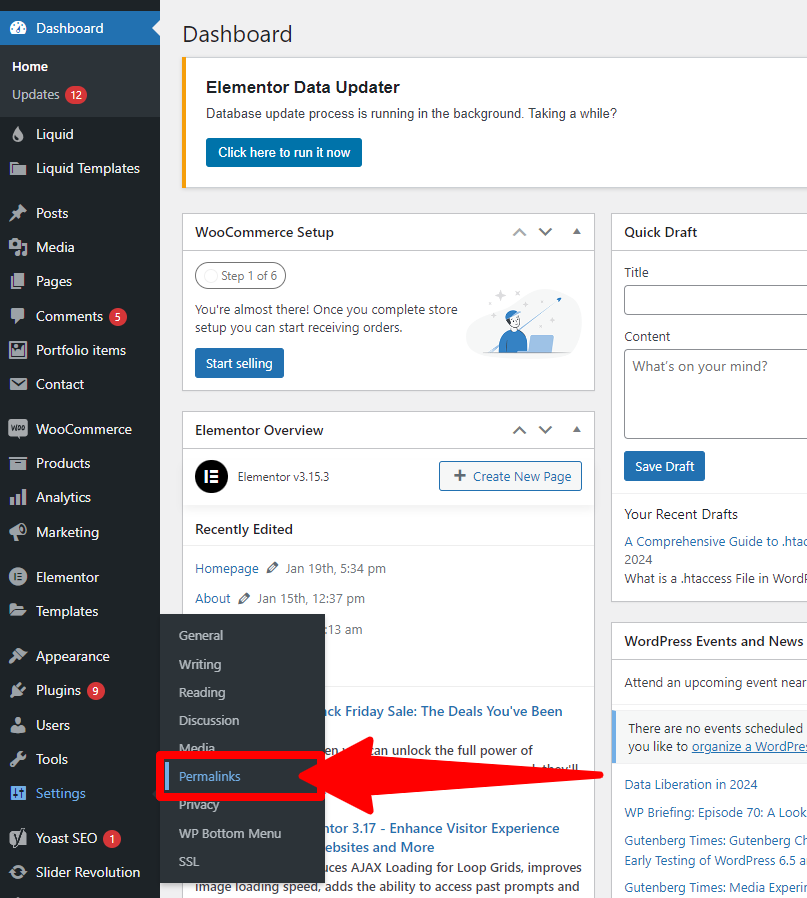
WordPress automatically rewrites your .htaccess file to handle the URL structure you specify when you go to Settings » Permalinks and choose the URL structure for your blog.
Moreover, plugins such as W3 Total Cache will edit your .htaccess file to set up the optimization and caching features that they provide.
How to Set Up the .htaccess File Manually
It is dangerous to manually alter the .htaccess file since a wrong configuration can result in serious server issues. You should download a backup copy of your .htaccess file to your PC. If something goes wrong, you can use that file.
WordPress may require you to manually update the .htaccess file if it cannot write to it. Take care to only duplicate exactly what it is that WordPress has provided you.
Additionally, you can access information on the best WordPress.htaccess techniques, where we show code snippets that allow you to modify your website. We explain how to create redirects, prohibit shady IP addresses, password-protect your WordPress admin area, and more.
In addition, if you search WPDruggy for “.htaccess,” you’ll discover thousands of objects that explain how to modify the file to enhance your website and address particular issues.
How to Access the .htaccess File
You will need to use the file manager feature in your WordPress hosting control panel or an FTP client such as FileZilla to access the .htaccess file.
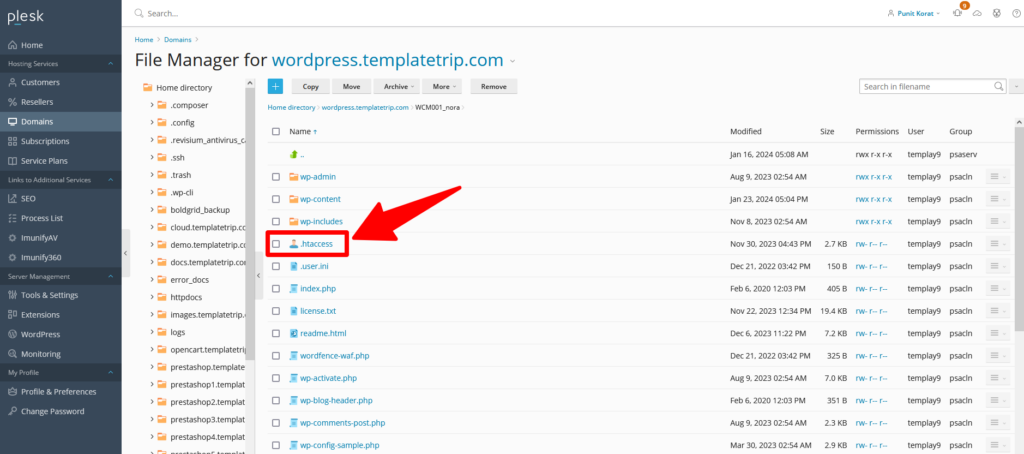
The .htaccess file should be located in your WordPress site’s root directory. However, file names that begin with a period are regarded by the server as hidden. Your FTP client might not show the file at first.
You must activate your FTP client’s “show hidden files” feature if you are unable to view these files. If your .htaccess file is still missing.
We hope that this post has expanded your knowledge of WordPress .htaccess files. For more relevant resources on helpful WordPress ideas, tactics, and tips.
Read Also More Blogs
- How to Install a WordPress Child Theme
- How to Set Up a WordPress Website: A Step-by-Step Guide
- Understanding the Role of CSS in WordPress
- How to Use Google Analytics with WordPress
- How to Backup Your WordPress Site
- How to Secure Your WordPress Website from Hackers
- How to Perform On-Page SEO For WordPress Website
- How to Perform Keyword Research for Your WordPress Blog
- How to Optimize Images SEO For WordPress Website
- Advanced SEO Tips for WordPress Websites
The Last Thought
In conclusion, learning how to work with WordPress’ .htaccess file offers up a world of options for optimizing and customizing websites. With the help of this strong configuration file, you may manage many aspects of the performance, security, and functionality of your website.
We’ve covered all the important components of the .htaccess file in this extensive guide. From performance improvements and security precautions to redirection and rewriting rules. The user experience and search engine rankings of your WordPress site. Can be greatly enhanced by knowing how to use this file.

