
Cart 0



Are you trying to fix the WordPress SEO crawl budget problem? The SEO crawl budget is the number of times search engines crawl pages on your website. A lower crawl budget may cause your pages to be indexed later than expected.
This can reduce your SEO ranks and overall visitors. In this article, we will discuss the WordPress SEO crawl budget issue and how to quickly fix it. Because this is a large topic, we have broken it into smaller parts. Here are the various items we’ll discuss in this essay.
What is the SEO Crawl Budget?
SEO crawl budget refers to the number of times search engines such as Google crawl pages on your website. Google bots crawl billions of sites per day. They try to calculate how many pages they will crawl on each website domain to make the best use of resources. The crawling algorithms automatically determine this number depending on a variety of criteria.
It varies daily, therefore there is no set number of pages the Google crawler will crawl on your website or WordPress blog. In general, larger websites with more material have a higher crawl budget, whereas smaller websites have fewer budgets. Other factors that influence the crawl budget include the popularity of a URL, freshness, update frequency, and so on.
However, for some reasons, you may waste your crawl budget on unnecessary pages. For example, if your website is not correctly optimized, search engines will allocate your crawl budget to less vital areas of your site rather than important material.
Similarly, you could be accidentally blocking search engines from crawling your website. If this occurs, your website may not use the crawl budget at all.
How Does Search Crawling Work?
Search engines such as Google use powerful bots (computer programs) to visit websites all across the internet. These bots monitor changes to your WordPress website and compare them to the main search index. If they come across fresh content, they add it to the search index. If they discover stuff that is already in the index but has changed, they update it with new content.
Search bots then follow all of the links on a page, repeating the process for future pages. Bots get around between links on a page in the same style as real crawlers along their webs. That is why the term crawling is used to describe this activity, and the bots may also be referred to as search engine spiders. To improve SEO, make sure search engines can simply crawl your website.
What Are the Causes of WordPress SEO Crawl Budget Issues?
The way WordPress creates URLs and duplicate content can lead to crawl budget concerns. WordPress, for example, creates RSS feeds for various regions of your website by default. There are RSS feeds for the main blog, categories, tags, comments on individual posts and pages, and even custom post kinds that have their own RSS feed URLs. Links to these RSS feeds are added to your website’s HTML source code, making them discoverable by search engines.
Search engines may now recognize and disregard duplicate content. However, they would still crawl them and consume your crawl money. Aside from that, search engines would crawl smaller items far more than required. This contains archive pages, taxonomies, authors, PDF files, and so on.
WordPress plugins and other third-party applications can also include query parameters in your WordPress URLs. Google’s spiders may treat these query parameters as a separate page and crawl it. For example, UTM parameters are used for Google Analytics tracking, and a page with or without these query parameters will appear the same.
Example: https://example.com/homepage/?utm_source=newsletter
This wastes your SEO crawl budget on less important items and causes a problem.
How Do You Calculate Your SEO Crawl Budget?
The SEO crawl budget is not a fixed quantity of pages. It changes significantly, and there is no accurate way to forecast how many pages Google will crawl on your website on any given day. However, current crawl activity might give you a good picture of how Google checks your page.
If you haven’t already, add your website to Google Search Console. It is a free tool supplied by Google to help website owners identify how their website performs in Google Search. Simply visit your Search Console dashboard. Navigate to the ‘Settings’ option in the left column and select ‘Open Report’ next to ‘Crawl statistics.’

The Crawl Stats report provides a summary of crawl requests on your website during the last few weeks.
Hover your mouse over the chart to see how many pages were requested per day.

This offers you an estimate of your website’s average crawl rate throughout this period.
The crawl activity is broken down by response code, file kinds, purpose, and Google bot type.
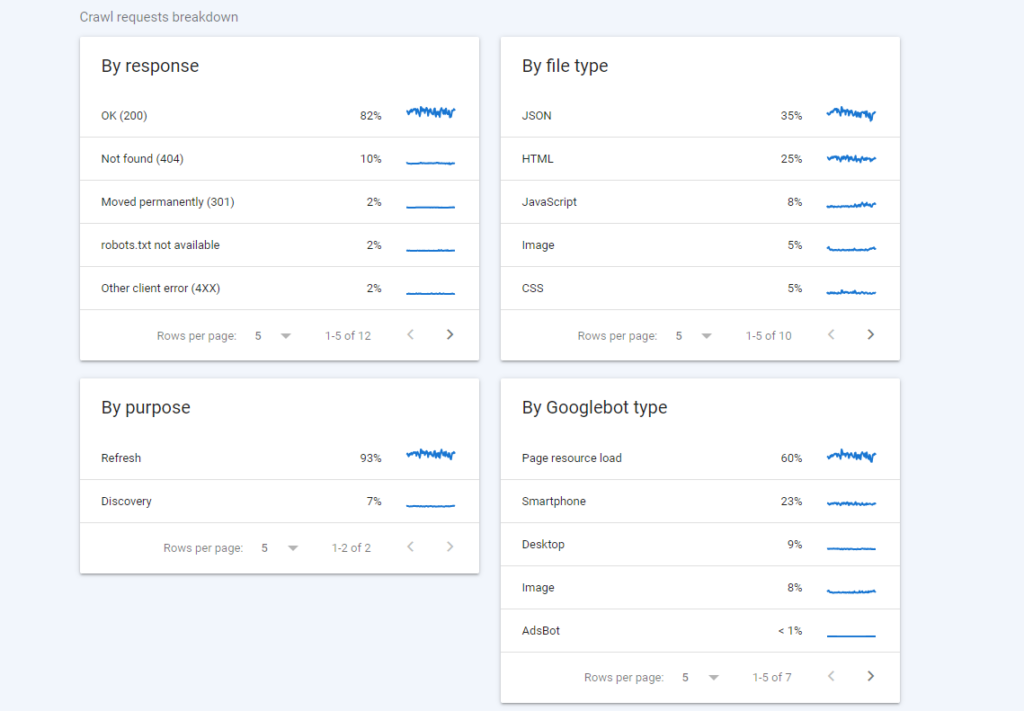
Why Should You Care About SEO Crawl Budget?
Search engines must crawl your website efficiently to index your material on time. However, if your SEO crawl budget is low, your important and recent material may not be crawled on time.
It may take many weeks for search engines to detect revisions to your older articles or find new content. You may miss out on search engine traffic, your SEO rankings may not improve, and you will lose money on sales or advertising.
How to Easily Optimize the SEO Crawl Budget in WordPress
The simplest and most secure approach to optimize your SEO crawl budget in WordPress is to use Yoast SEO for WordPress. It is the greatest WordPress SEO plugin with an integrated SEO crawl optimization tool. First, set up and activate the Yoast SEO for the WordPress plugin.
For additional information, visit our step-by-step guide on how to install a WordPress plugin. There is also a free edition of Yoast SEO that contains a crawl-cleaning option. We recommend purchasing the premium plugin’s PRO plan, which includes access to the Redirection Manager tool for fixing 404 issues on your website.
Then, go to the Yoast SEO » Settings.
Then, click on the Advanced tab.
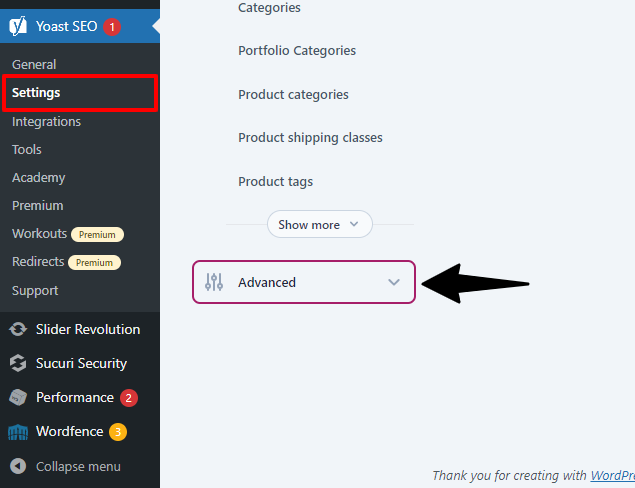
Scroll to the bottom of the page to see the ‘Crawl Optimization‘ option.
Click on it to enable the ‘Crawl Optimization’ feature.
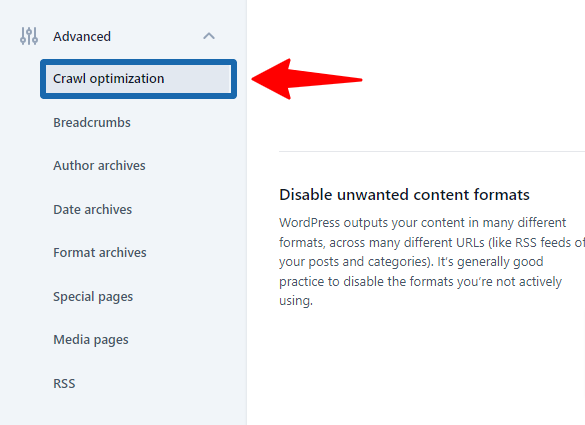
The first option in the crawl optimization is to remove the query arguments. You can specify which query arguments to allow in the list below. Advanced users can apply Regex regular expressions here.
The next screen will display WordPress RSS feed options. Yoast SEO will display a variety of RSS feeds generated by WordPress, and you can disable the less important RSS feeds.
For example, if you have a single-author blog, you can disable author feeds. Once you’ve removed all of the undesirable RSS feeds, remember to click the ‘Save Changes’ button to save your settings.
How to Create Redirects for Error Pages
Yoast SEO will automatically create redirection for feeds that you have disabled. For example, a tag RSS feed will send visitors to the tag archive website. Next, navigate to your Google Search Console dashboard and view the crawl analytics report. From here, you may view the pages that included errors.
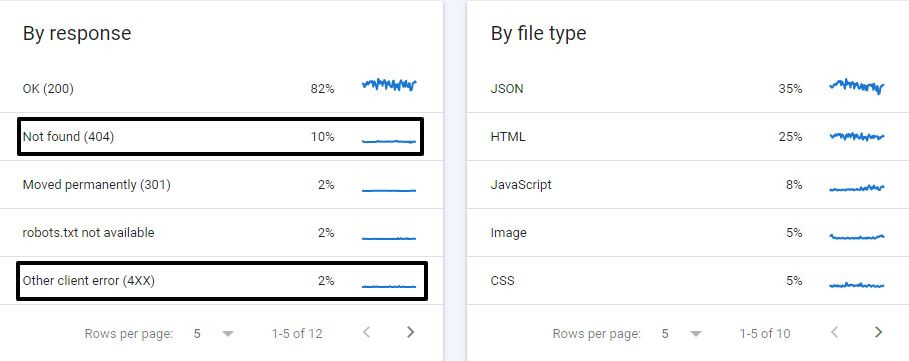
Now, based on the status code, you can configure redirects for particular pages.
For example, you can redirect 404 errors to a related page. You can also examine other pages for issues and configure redirects for them.
Yoast SEO simplifies the process of setting up redirects on your WordPress website. Simply navigate to the Yoast SEO » Redirects page and enter the old URL as the ‘Source URL’ and the new URL as the ‘Target URL’ fields.
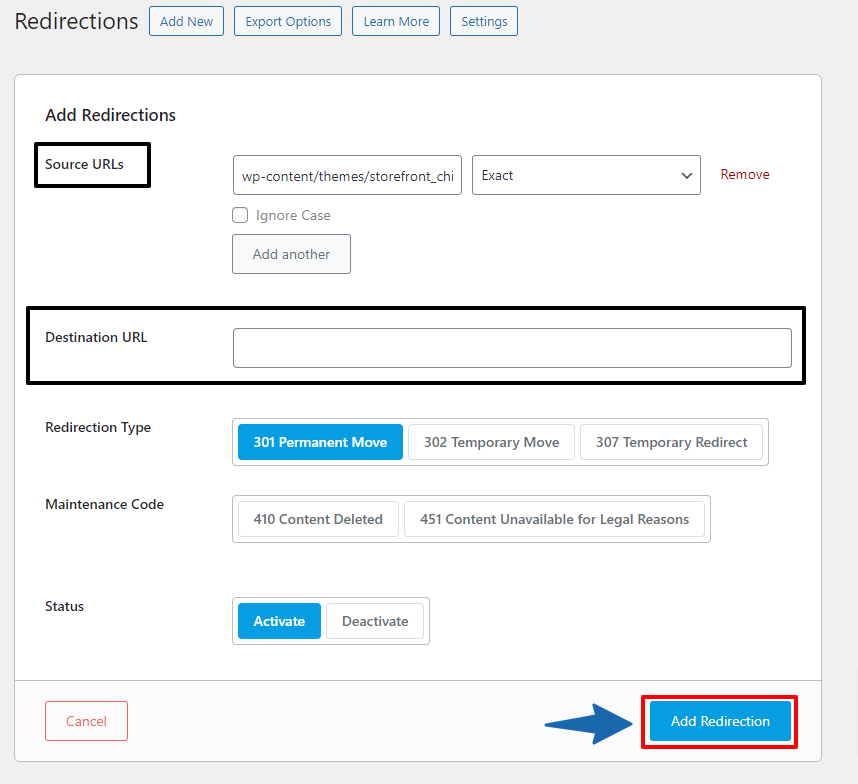
Click the ‘Add Redirect‘ button to save your changes. Then you can simply repeat the process to set up other redirects as needed.
Read More Relevant Articles
- How To Easily Disable the Default WordPress Sitemap
- How to Disable Overflow in WordPress – Remove Horizontal Scroll
- How to Disable WordPress Admin Email Verification Notice
- How to Delay Posts from Looking in the WordPress RSS Feed
- How to Enable Automatic Updates in WordPress for Major Versions
- How to Properly Disable Lazy Load in WordPress
- How to Easily Add Custom Code in WordPress
- 10+ Most Popular Digital Products Can Sell Online in 2024
- 10+ Best WordPress Themes for SEO Experts in 2024
- How to Do Keyword Research for Your WordPress Blog
The Final Thought
In conclusion, optimizing your WordPress site for SEO crawl budget management is crucial for ensuring search engines efficiently crawl and index your content. By implementing the strategies outlined in this guide, such as improving site speed, optimizing site structure, managing low-value pages, and utilizing tools like XML sitemaps and robots.txt, you can effectively maximize your crawl budget allocation and enhance your site’s visibility in search engine results. Remember, regular monitoring and adjustment of these tactics will help you stay ahead in the ever-evolving landscape of SEO.

